IoT Architecture: Layers, Diagram and How Industrial Systems Are Built
Maciej Sułek, Co-founder & CTO | | 10 min read
The brief
An IoT architecture moves data from devices through connectivity, an edge gateway and a cloud platform to the application, and sends commands back the same way. This guide compares the 3-layer and 5-layer models and lists what to check so that a dropped connection does not go unnoticed in production.
An IoT architecture carries data through a chain of layers: devices and sensors, connectivity, an edge gateway, a cloud platform that ingests, processes and stores the data, and the application people work in. Commands travel back to the devices the same way. Textbooks compress this into three layers (perception, network, application) or five (perception, transport, processing, application, business).
Most guides draw the same boxes. The difference between a diagram and a production system shows up when the connection drops: an MQTT client with a clean session loses its subscriptions without any error, and an edge device that has gone offline can still look healthy in the portal. The examples come from industrial and energy systems we have built for Skyfri, Zeronest and KYOTO as part of our industrial IoT services.
IoT architecture layers: the 3-layer and 5-layer models
The two models you will meet most often have three layers and five. The three-layer model has a perception layer (the physical devices and sensors), a network layer (connectivity) and an application layer (the service delivered to the user). The five-layer model splits the network layer into transport and processing and adds a business layer on top, which manages the whole system and its business and profit models.
The study "Internet of Things Architectures: A Comparative Study" (dos Santos et al., 2020, arXiv 2004.12936) describes both models and notes that sources name the middle layers differently. The same study points out that the five-layer model leaves security and privacy out. That is why search results show anything from four to six layers. For the basic terms, see the IoT glossary entry and our explainer on what industrial IoT is.
When you build a system, it helps more to know what each layer does and how it fails. The table below uses the layers you actually deploy.
| Layer | What it does | Typical risk in production | Example from our projects |
|---|---|---|---|
| Devices and sensors | Read values from equipment and accept commands | The data path depends on the manufacturer's cloud or the household Wi-Fi | Zeronest: device wired to the inverter over RS485/Modbus, reporting over LTE |
| Connectivity | Moves messages between device, gateway and platform | An MQTT client with a clean session loses its subscriptions after a disconnect (HiveMQ, ThingsBoard) | Zeronest: MQTT with TLS 1.2 to AWS IoT Core |
| Edge gateway | Runs local logic and buffers messages during outages | Buffered messages expire after the TTL (7200 s by default on Azure IoT Edge) or when the disk fills (Microsoft Learn) | Skyfri: EMS control decisions made locally on Azure IoT Edge, so the EMS could run fully offline |
| Cloud platform (ingestion, processing, storage) | Receives, processes and stores data for the whole fleet | On AWS IoT Core, a persistent session expires after one hour by default and QoS 2 is not supported (AWS docs) | Zeronest: AWS IoT Core; Skyfri: Azure IoT Hub as the cloud side |
| Application | Dashboards, alerts, reports and integrations | On Azure IoT Edge, a device that went offline can still show as healthy (200 OK) because the agent stops reporting (Microsoft Learn) | Skyfri: monitoring runs as a separate layer in Skyfri Intelligence |
The application layer is where industrial IoT analytics and dashboard design come in.
What the extra layers in the 5-layer model change
In the three-layer model, "network" covers both moving the data and making sense of it. The five-layer model separates transport (getting messages from the device to the platform) from processing (storing, filtering and analysing them). In a real system those are often different services with different owners. The business layer adds questions of system management and profit that the three-layer model does not ask.
IoT architecture diagram: a reference industrial system
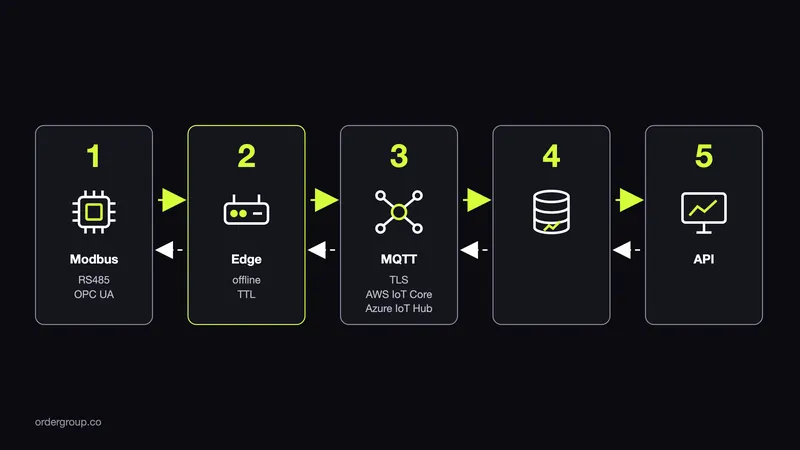
A reference IoT architecture diagram for an industrial system has two paths. Telemetry goes up from the device, and commands come back down.
Telemetry path, from device to application:
- Device or sensor. Reads values from equipment, such as an inverter, a battery or a meter, often over a fieldbus such as RS485 with Modbus.
- Edge gateway. Collects readings locally, runs logic that cannot wait for the cloud and buffers messages when the uplink is down.
- Broker and ingestion. An MQTT broker or a managed service such as AWS IoT Core or Azure IoT Hub receives messages over a secure connection.
- Processing and storage. Rules, stream processing and time-series storage turn raw readings into state and history.
- Application. Dashboards, alerts, reports and integrations used by operators and the business.
Command path, from application to device: a setpoint or schedule leaves the application, passes through the platform and the broker, reaches the edge gateway and is written to the device. Most generic diagrams leave this path out, and it is the one with the strictest requirements, because a command that arrives late or twice can change how equipment behaves.
A real chain: Zeronest
In the Zeronest system, a device wired to the inverter over RS485/Modbus sent readings over LTE, using MQTT with TLS 1.2, to AWS IoT Core. The device, the Bzyk D200, is Zeronest's own hardware, and the LTE link kept the data path independent of the inverter manufacturer's cloud and of the household Wi-Fi. Customer data stayed in the EU. Every minute the system decided whether to charge, discharge or sell energy. It worked with 16 inverter brands and ran on more than 3,000 prosumer storage installations (as of April 2026). The Zeronest case study describes the platform built on this chain.
Edge or cloud: where should the logic run?
Run the logic that has to keep working without the internet at the edge, and send everything that benefits from fleet-wide data to the cloud. Control decisions for physical equipment usually belong at the edge. Analytics, reporting and comparisons across many sites belong in the cloud.
The energy management system (EMS) we built for Skyfri's solar and battery platform went into production in June 2024 at 7 plants and controlled more than 5 MWh of battery storage. The EMS made its control decisions locally on Azure IoT Edge, so it could run fully offline, with Azure IoT Hub as the cloud side. It worked with batteries and inverters from several manufacturers. Monitoring runs as a separate layer in Skyfri's own product, Skyfri Intelligence.
What offline really means on Azure IoT Edge
Microsoft's documentation, "Operate Azure IoT Edge devices offline" on Microsoft Learn, sets out the details:
- After the first sync with IoT Hub, an edge device can work without a connection indefinitely.
- The edge hub buffers outgoing messages and, when the connection returns, sends them in the original order.
- How long messages survive depends on the time-to-live setting and free disk space. The default TTL is 7200 seconds, or two hours.
- While offline, the agent does not report status, so the portal can keep showing the device as healthy (200 OK).
If an outage can last longer than the buffer TTL, raise it and size the disk, or accept that older readings will be lost. And do not treat a green status as proof that the device is online.
Which protocols connect the IoT architecture layers: MQTT, Modbus, OPC UA, HTTP?
Modbus links devices to the gateway, OPC UA carries data with its information model on the factory floor, MQTT moves messages from the gateway to the cloud, and HTTP serves polling and REST integrations. Each fits a different boundary between layers.
| Protocol | Model | Where it fits | Note |
|---|---|---|---|
| Modbus | Fieldbus protocol, often over RS485 | Device to gateway | The register map (which value sits at which address) differs between manufacturers, so someone has to own those maps |
| OPC UA | Data with an information model | Factory floor, especially brownfield plants | In the VDMA 2025 study of German machinery and plant makers, 57% of companies used it in production and about half of new products already supported it |
| MQTT | Lightweight publish/subscribe | Gateway to cloud; devices with limited resources and unreliable networks | Three QoS levels: 0 (at most once), 1 (at least once), 2 (exactly once) |
| HTTP | Request/response | Polling and REST integrations | Less suited to a continuous stream of telemetry |
The OPC UA figures come from the VDMA 2025 interoperability study of German machinery and plant makers, reported by fertigungstechnik.de on 28 November 2025. The MQTT quality-of-service levels are defined in the OASIS specification.
MQTT or OPC UA?
You often use both. In an OPC Foundation article, "OPC UA, MQTT and Information Interoperability", Erich Barnstedt, Chief Architect Standards & Consortia for Azure IoT at Microsoft, describes OPC UA as the payload and MQTT as the transport. OPC UA gives the data its meaning; MQTT moves it efficiently to the cloud.
Check the platform limits too. According to the AWS IoT Core Developer Guide, AWS IoT Core supports QoS 0 and 1 but not QoS 2. A persistent session stores subscriptions and unacknowledged QoS 1 messages. By default it expires after one hour. In MQTT 3 that is an account-wide setting; in MQTT 5 you can raise the limit to seven days. If your design depends on exactly-once delivery, it has to come from your own application logic, such as idempotent commands.
What breaks in production: an IoT architecture checklist for CTOs
Many production failures happen at the joins between layers, often when a connection drops. One industry pattern, described by HiveMQ in "MQTT Essentials part 7", by ThingsBoard in "Non-persistent and persistent sessions" and in the AWS IoT documentation, shows how this goes unnoticed:
- An MQTT client that connects with a clean session loses its subscriptions when the connection drops and has to subscribe again after reconnecting.
- With a persistent session (clean session set to false), the broker keeps the subscriptions and queues messages for the same client ID.
- In MQTT 5, Clean Start and Session Expiry Interval replace the clean session flag. The expiry interval defaults to 0, so the session ends when the client disconnects.
- The client should keep its own list of subscriptions and restore them after reconnecting, whatever the broker does.
A client that reconnects without resubscribing looks connected and receives nothing. Combine that with an edge status that stays green while offline, and a device can go quiet without anyone noticing.
Checklist: before you approve an IoT architecture
- What works without the internet? List the functions that must keep running offline and confirm they run at the edge.
- How much can the buffer hold? Check the message TTL and free disk space against the longest outage you expect.
- Does the MQTT client resume the connection and its subscriptions? Use a persistent session or keep your own subscription list and restore it.
- Does device status tell the truth when offline? Make sure a device that stopped reporting does not still show as healthy.
- Who owns the Modbus register maps and the devices? Decide who maintains the maps for each manufacturer and model.
- How do you update devices? Plan staged rollouts rather than updating the whole fleet at once.
- Where does the data live? Confirm the regions, for example that customer data stays in the EU.
- What depends on the manufacturer's cloud? Identify every function that stops if a vendor's cloud or the household Wi-Fi goes down.
For the security side of these decisions, see our guide to IoT security.
How to choose an IoT architecture before you build
Choose an IoT architecture by settling your constraints first: the devices and protocols on site, offline behaviour, response times, updates and security boundaries. Answer these questions before anyone draws a diagram:
- Which devices and protocols are already on site, and which will be added?
- What has to keep working during an outage, and for how long?
- Which decisions need a response in seconds, and which can wait for the cloud?
- How will devices be updated and replaced over the life of the system?
- Where are the security boundaries between the device network, the platform and the users?
KYOTO shows how an architecture grows. Its MVP started as UX/UI work and, over three and a half years of work on industrial IoT and a digital twin of a thermal energy storage system, grew into a SCADA-based building management system (BMS) that monitors and controls energy flow in real time. More projects are in our industrial IoT examples.
Our work covers the software architecture of these systems. We do not write microcontroller firmware (C/C++), embedded Linux or Bluetooth Low Energy (BLE), and PCB design goes to a hardware partner.
To map this before anything is built, we run a free discovery workshop that covers hardware, protocols, offline behaviour, updates and security boundaries.
IoT architecture: frequently asked questions
What are the layers of IoT architecture?
The three-layer model has perception (devices and sensors), network (connectivity) and application (the service for the user). The five-layer model splits the network into transport and processing and adds a business layer. In a deployed system the layers are devices, connectivity, edge gateway, cloud platform and application.
What is the difference between 3-layer and 5-layer IoT architecture?
The five-layer model divides the three-layer network layer into transport, which moves messages, and processing, which stores and analyses them. It also adds a business layer for managing the system and its business and profit models. Sources name the middle layers differently, so counts of four to six layers are common.
Should IoT data be processed at the edge or in the cloud?
Process at the edge anything that must keep working without the internet, such as control of physical equipment. Send to the cloud whatever gains from fleet-wide data, such as analytics and reporting. The EMS we built for Skyfri made its control decisions locally on Azure IoT Edge, so it could run fully offline.
MQTT or OPC UA for industrial IoT?
Often both. OPC UA is common on the factory floor because it carries an information model with the data, while MQTT is a lightweight publish/subscribe transport to the cloud. Microsoft's Erich Barnstedt describes OPC UA as the payload and MQTT as the transport in an OPC Foundation article.
What happens to an IoT system when the internet connection drops?
Azure IoT Edge keeps working offline, buffers outgoing messages for up to 7200 seconds by default and, when the connection returns, sends them in the original order. An MQTT client with a clean session loses its subscriptions and must resubscribe. While offline, device status may still look healthy in the portal.
Next steps
If you are planning a connected system and want the layers, protocols and offline behaviour settled before development starts:
Planning a connected system? Settle the layers, protocols and offline behaviour before development starts.
Book a free discovery workshop