
Custom Android OS for device manufacturers: OS, app store, OTA and MDM
A bad update on phones already in users' hands cannot be rolled back like a website release. We build Android-based systems on AOSP with the app store, OTA updates and device management around them, as we did for RAW Cyber.
Tell us about your device.
A few details about the hardware and the update path help us prepare the free discovery workshop.





A custom Android OS for device manufacturers
A custom Android OS for devices is an operating system built on the Android Open Source Project for one maker's hardware, together with the services that Google would otherwise provide. AOSP is the open code of Android, from which a device maker can build its own system for its own devices. Without Google services, the maker has to handle app distribution, updates and device management on its own. Our AOSP development services cover four layers: the operating system, app distribution, system updates and device management. This work is one part of our IoT and device software development.
We do it for CTOs and product owners at companies that make Android devices, such as phones, terminals or security devices, and that cannot or do not want to depend on Google Play.
Two projects show the scope:
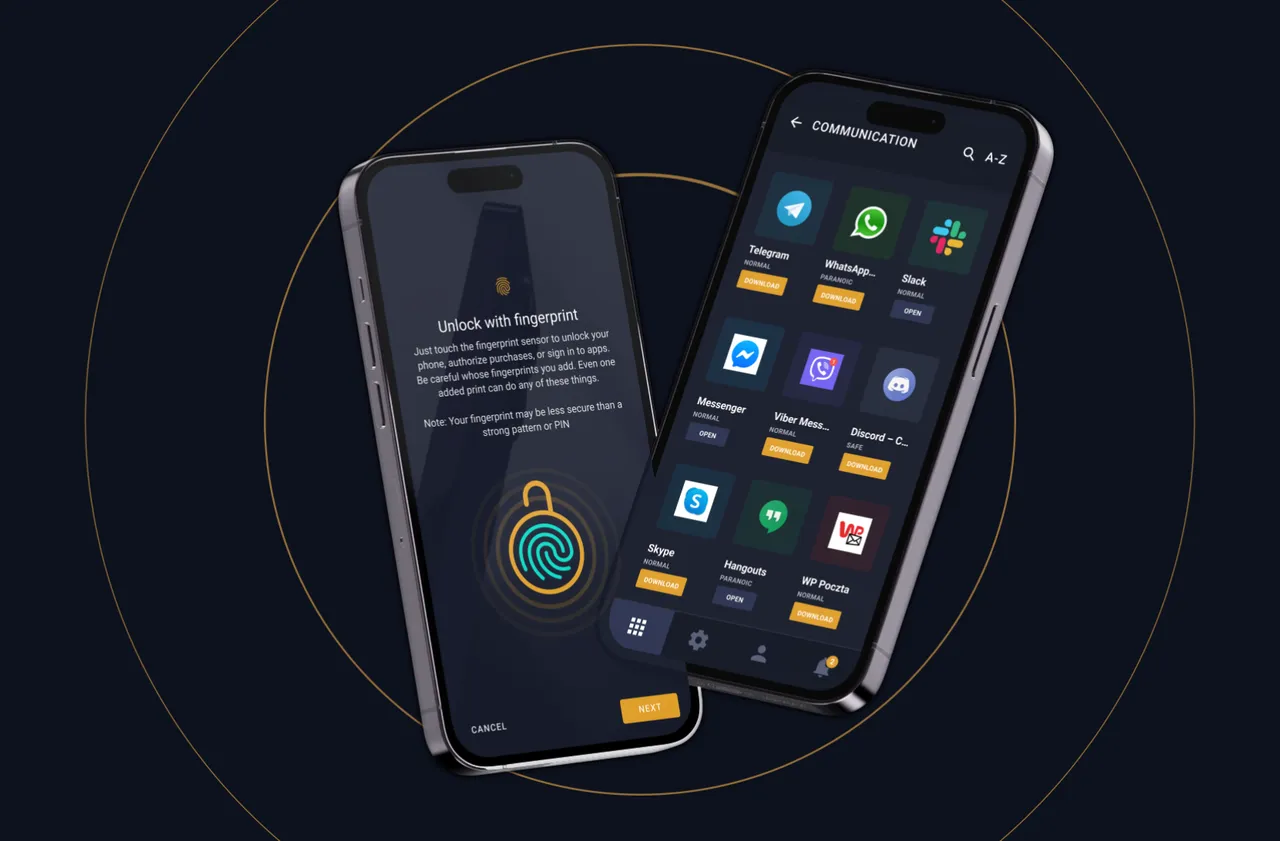
- For RAW Cyber we built RAW OS, a custom operating system based on Android and hardened with CopperheadOS. The project, called "RAW Secure Phone", ran from July 2018 to April 2022. The RAW Cyber case study describes it from the client's side.
- For Mudita, starting in July 2022, we built the App Store, the Developer Portal and the OTA update platform for the Mudita Kompakt phone, which runs on AOSP.

Hardening the OS: RAW OS on Android
For RAW Cyber we hardened RAW OS at the system level, on top of CopperheadOS. We moved the CopperheadOS code to our own repository, and in the first sprint, in August 2018, we were already working on locking the bootloader of a Pixel phone with our own Android Verified Boot key. We prepared and tested the system on Pixel 2 / 2 XL and Pixel 3 / 3 XL phones.
RAW OS enforced these security rules:
- Users had to set a screen lock, and the system detected a change of SIM card.
- Connections used SSL pinning.
- Bluetooth connections to devices that were not on a whitelist were blocked.
Network traffic inspection on the device
Traffic inspection in the system let a company block selected protocols and apps on its phones, for the whole company or for one user group. RAW OS inspected network traffic on the device, a form of deep packet inspection. A link classifier ran from 2020. In April 2021 we compiled the nDPI library for ARM and integrated it with the system. In August and September 2021 we added DNS detection, URL extraction and the blocking rules.

Your own app store and developer portal
RAW Store: approved apps only
Mudita Developer Portal: accounts and review
Mudita App Store in 2026
OTA updates you can roll out in phases
Phased OTA updates let a device maker send a new system version to part of the fleet first and stop the rollout if something goes wrong. An OTA update installs new software on the device over the network.
For RAW OS we prepared the OTA procedures in September 2019 and delivered the production version, with an OTA test, to the client in January 2020. Further OTA builds were made at the client's request.
The second stage of Mudita's OTA platform, from May to July 2026, added:
- incremental updates, with the full package kept as a fallback,
- automatic generation of incremental packages,
- checks of previous versions when a new version is configured,
- a phased rollout in 1 to 10 phases, with each phase set from 0 to 720 hours.
Before the new OTA panel went live in September 2026, end-to-end tests covered the rollouts of all published versions. The tests were completed on 29 September 2026.

Keeping a custom Android OS current
A custom Android OS needs maintenance for as long as devices run it, because the code it is built on and the hardware both keep changing. For RAW OS, keeping up with changes in CopperheadOS and with new devices was a separate stream of work.
When Copperhead moved to Android 11, we aligned the repositories, rebuilt the system from scratch and ported our features to it. The move was complete in September 2021.
Android device management built into the system
Android OS customization can put device management inside the system itself, with no separate MDM app to install. RAW OS had these management features:
- an admin panel for companies and user groups, with the status of each device,
- the list of Wi-Fi networks, managed in the admin panel,
- a setup wizard for the first start of the phone.
A device that lost its connection was protected in three steps: a report, a warning and an automatic wipe of its data. In the panel these thresholds could be set to, for example, 5, 60 and 120 minutes. If the SIM card was removed from a locked phone, a 10-minute countdown to a reset started.
RAW OS also controlled access to the camera, microphone and location, data limits for apps, the allowed USB modes and device attestation.
Do you have questions?
Custom Android OS development - FAQ
-
Order Group does. We build Android-based systems on AOSP together with the app store, OTA updates and device management around them. From 2018 to 2022 we built RAW OS for RAW Cyber, and starting in July 2022 we built the App Store, the Developer Portal and the OTA platform for the Mudita Kompakt phone, which runs on AOSP.
-
Yes. For RAW Cyber we built RAW OS, a custom system based on Android and hardened with CopperheadOS. Without Google services the device also needs its own app store, OTA updates and device management, and we built those for RAW OS as well.
-
We prepared and tested RAW OS on Google Pixel phones: Pixel 2 / 2 XL and Pixel 3 / 3 XL. In the first sprint, in August 2018, we were already working on locking the Pixel bootloader with our own Android Verified Boot key.
-
Through your own app store. RAW Store accepted only approved apps, and the system blocked installing apps from outside the store. The Mudita App Store and Developer Portal review each app before publication and show developers an APK scanner report.
-
A phased rollout sends the update to part of the fleet first, so a problem shows up before every device has it. On the Mudita platform this means a rollout in 1 to 10 phases, incremental updates that keep the full package as a fallback, checks of previous versions and end-to-end tests of all published versions before a new OTA panel goes live.
-
Yes. In RAW OS it was built into the system, with an admin panel for companies and user groups and system-level control of the camera, microphone, location and USB modes. A device that stayed offline triggered a report, then a warning, then a data wipe, and removing the SIM card started a countdown to a reset.
-
Kiosk mode in an MDM app locks a standard Android device to selected apps through Android's management APIs, so the lock depends on that app running on top of the system. On a custom Android OS the same limits can be written into the system itself. In RAW OS, apps came only from RAW Store, and access to the camera, microphone and USB was controlled at system level.
-
Not always. Most Android MDM products manage devices through Android Enterprise, which expects Google services on the device. On your own AOSP-based system, management can be part of the system instead. RAW OS had an admin panel for companies and user groups, device status, managed Wi-Fi lists and an automatic data wipe for devices that stayed offline.
-
Keeping the system current is a separate stream of maintenance work. When Copperhead moved to Android 11, we rebuilt RAW OS on the new base, ported our features and completed the move in September 2021.
-
Yes. In RAW OS we compiled the nDPI library for ARM and integrated it with the system, and in 2021 we added blocking of protocols and apps for a company or a user group.
-
With a free discovery workshop, where we describe the hardware, the update path and the security boundaries before any code is written. Copyright in the code passes to you with each payment and you receive the source code. We reply to a form message within 48 hours on working days.
Why work with us: how a custom Android OS project runs
A custom Android OS project with us starts with a free discovery workshop. Before any code is written, we describe the hardware and who makes it, the protocols, how the device behaves offline, the update path and the security boundaries.
We work on the Android system and on the software around it: the app store, the OTA platform, the admin panels and their backend. For RAW Cyber the backend and panels ran on Django and Celery, with Nginx and Gunicorn serving the traffic, and the work ran in Scrum. Mudita's platform was built in Java, Kotlin, Python and Django.
Copyright in the code we write for you passes to you with each payment, within the scope of use set in the contract, and you receive the source code. We reply to a message sent through the form within 48 hours on working days.
A secure phone with its own Android-based system
Custom Android OS case study
-
RAW Cyber - Secure Custom Android Operating System
Even with the challenging demand, the team was able to provide designs and other OS features already. The team managed to deliver on time and they understand the specifics of the security industry.


An Android system for your device, from the discovery workshop to OTA updates after launch.
Your message goes to
Filip Szamborski
Co-founder & CEO

Your message goes to
Karol Oponowicz
Co-founder & Business Owner
Your message goes to
Paweł Zieliński
Co-founder & Business Owner
SO FAR WE HAVE WORKED WITH BRANDS LIKE:
Thank you for your message.
We read every message ourselves and get back to you within 48 hrs on business days.
Something urgent? hello@ordergroup.co