What are the UX and UI challenges in the Automotive industry?
Iza Mrozowska, Former Head of Design | | 5 min read
The brief
Gone are the days when a car was simply a tool for getting us from point A to point B. In 2023, vehicles have become powerful computers on wheels that provide information, entertainment, and connectivity. They inform us about the car's internal status, the external environment, and even activities happening hundreds of kilometers away. This means drivers engage with their vehicles on multiple levels, which is both an opportunity and a challenge for UX and UI designers. Designers shape these interactions through a graphical user interface, and their work affects the safety of hundreds of millions of people globally. So let's look at some of the challenges in the design process and at UX and UI design examples implemented by industry leaders.
Engagement vs. Safety
The Ultimate Challenge of User Interface Design: Engagement vs. Safety
While traditional UX design principles, familiar from mobile apps and web design, aim to keep users engaged, the automotive interface must do the opposite: keep drivers focused on the road.
This calls for understanding user behavior, ergonomics, and how drivers process information while driving.
Car UI components and interface elements need to be transparent and minimalist, with large text, switches, and buttons, enabling users to interact without diverting their gaze from the road.
As designers, we must also consider the driver's reach, sight lines, or nuances like differences between left- and right-handed drivers.
All these factors can affect the safety of driving.
Take Volvo's XC90 interface as an excellent example of safety-focused design. The user interface minimizes distractions and helps the driver concentrate on the road, thanks to large, clear icons, intuitive menus, and controls that you can operate without taking your hands off the wheel.
On the other hand, although many people appreciate Tesla's modern and minimalist design in some models, numerous functions, even ones as critical as adjusting side mirrors, are controlled through a large touchscreen, which demands more attention and time from the driver than traditional physical switches.
User Experience vs. Driving Autonomy
Smooth Control Handover
Many of today's cars can control steering, acceleration, deceleration, and even change lanes on highways. Using sensors, cameras, and machine learning, cars can make increasingly advanced and intelligent decisions, removing decision-making power from drivers.
This creates a significant UX and UI design challenge: how should a car signal that it's taking control?
Tesla's Autopilot system, which allows for some driving autonomy, has faced criticism due to its name suggesting fully autonomous driving. There have been instances where Tesla drivers, mistakenly assuming their cars were fully autonomous, crashed while driving on Autopilot and not paying attention to the road.
It is a seemingly minor issue, but the term "Autopilot" itself has led to dangerous misunderstandings about the system's capabilities.
On the other hand, Audi designed a system for its A8 model called Traffic Jam Pilot, meant to allow conditional automated driving in specific conditions, like traffic jams up to 60 km/h (Audi never activated it in production cars). The system has clear rules about when it can be activated and when it needs to give control back to the driver. When the system needs to hand back control, the driver receives a series of visual, acoustic, and even physical alerts, including seat vibrations.
Responsible Driving
Educational Role of UX/UI
An interesting aspect of UI design in electric cars is educating users about sustainable driving, battery longevity, road safety, and reducing environmental impact. The user interface can act as a guide that shows what responsible driving looks like and how driving habits affect the outside world.
The challenge for designers is to educate drivers painlessly. They should feel encouraged to improve rather than feel they're doing something wrong.
For example, the Prius "Eco Score" UI element rates the driver's style based on energy efficiency, helping them understand how their behavior affects fuel consumption and CO2 emissions.
Ford deserves praise for the SmartGauge technology with the "EcoGuide" function in its Fusion hybrid model, introduced as early as 2010. The interface uses a plant growth analogy to show drivers their eco-driving level. The more energy-efficiently the car is driven, the more leaves appear on a virtual tree displayed on the dashboard.
Driving Emotion and Desire
UX in Sales and Brand Awareness
Safety, intuitiveness, and education all matter in a car. However, it must also be marketable, and that's where UX and UI design come into play. At the end of the day, we design the user experiences and interfaces that create emotional connections between the customer and the product.
And these things sell.
Through interactions with a well-designed interface, drivers can experience the pleasure of driving, identify with the brand, and ultimately want to be part of it by purchasing a vehicle and promoting the brand further. Interfaces can also focus on different driver experiences and so appeal to distinct customer segments.
For instance, Tesla's sleek, modern interface and advanced autopilot features make the car feel innovative and exciting. Because of its design, owning a Tesla is viewed as joining the vanguard of automotive technology, which is a strong selling point.
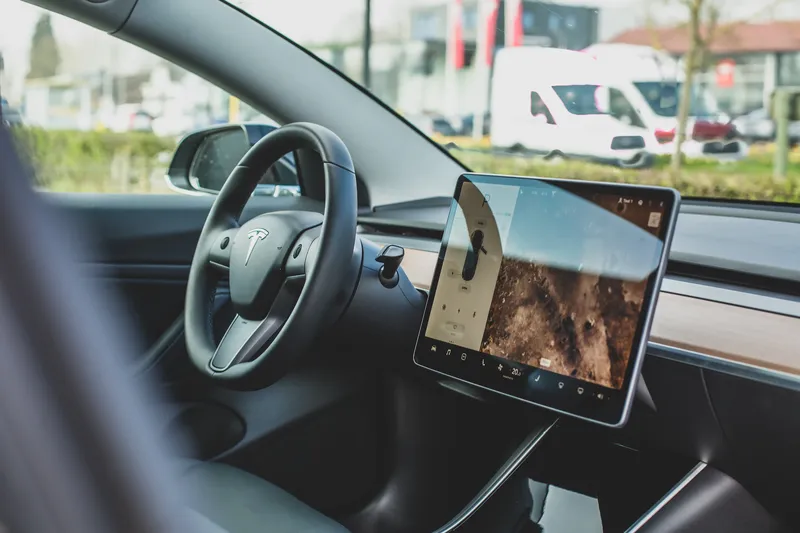
The stark design differences between Tesla and the previously mentioned Volvo are no accident. These two companies target different driver segments, and UX/UI is a medium to communicate brand values and attract the right customers.
Integration with Other Devices
The Role of UX in Integration with Other Devices
In the era of smartphones and smartwatches, the integration between a car and other devices has never mattered more. Drivers expect a seamless connection between their smartphones and vehicles.
This raises another UX/UI question of how deeply a car should integrate with other devices. Should the interface merely display apps from the phone or offer dedicated apps and features unavailable elsewhere?
I believe that Apple CarPlay has done it the right way. It allows drivers to use numerous iPhone functions directly through the car's infotainment screen, and the whole logic behind its usage is the same as on iPhones or MacBooks.
Managing Information and Data Through Proper UX and UI Design
Cars also generate vast amounts of information about the vehicle's technical condition, road conditions, weather forecasts, or even the location of the nearest charging station. But how do you present all this information to the driver without overwhelming them with data and, again, without diverting their attention from the road?
How do you choose which information is most important? How do you organize and present it in a clear, helpful way?
This is yet another challenge for UX/UI designers. We need to understand what information is most important for drivers, what their priorities are, and how to present this information in a way that is intuitive and understandable.
And hey, what about cultural and language differences that can influence how information is received and understood?
UI of the Future
The list of UX and user interface challenges is long and virtually endless, and so is the list of design tools. Design is a process, and as we continue to develop technologies and introduce new solutions to cars and beyond, we designers, equipped with these tools and insights from user research, will have plenty of material to work with.
And there's no sign of that changing anytime soon, so, dear UX designers, brace yourselves!
Let's schedule a workshop session for your product
GO TO THE FORM