How to Build Your Own CMS and Why You Might Need One
Michał Dżaman, Co-founder & Head of Backend | | 6 min read
The brief
A Content Management System (CMS) is a type of software used to publish, modify or organize content on websites. CMSs were created primarily to make it easier to run websites, online stores and blogs, especially those that are frequently updated, contain a lot of content, or have a complicated structure.
Thanks to CMS solutions, users can update and expand websites without knowing any programming languages, and learning a CMS is usually much easier than learning HTML or CSS. A CMS should be intuitive and relatively easy for everyone who edits the website.
A custom Content Management System is a dedicated system with an individually created graphic design and functions selected to match the customer's needs. It is usually built with maximum ease of use and website speed in mind.
The Needs
Why You May Need a Custom CMS
When deciding whether to choose one of the popular content management systems (Joomla, WordPress, etc.) or to invest in a custom CMS, you need to answer one question: does an available ready-made CMS meet all my needs?
Well-known CMSs like WordPress serve some companies just fine, but for others they are not enough. Here is what a custom CMS has to offer.
The Benefits
Security
Popular CMSs are an attractive target for hackers who know dozens of ways to steal user data or intercept other sensitive information. All they need is a hole in the plugin code, the theme, or the CMS software itself.
As soon as information about a discovered vulnerability appears online, millions of websites around the world may already be infected. A custom CMS is a less common target for automated attacks, although it still needs regular security updates.
Should you really be concerned about the security of your data?
Yes. Take a look at some statistics provided by TechJury:
- Every day, 30,000 websites are hacked.
- 64% of companies worldwide have experienced at least one form of a cyber attack.
- There were 20M breached records just in March 2021.
Endless Possibilities
The development team can implement any features you want, as long as they are feasible, and the solutions on your website will adapt to your requirements. A custom CMS can be built on the latest technologies that best suit your platform. Unlike an off-the-shelf CMS, a custom content management system can be fully personalized.
Take a look at one of our projects for the Contour company. We designed a platform for diabetics. The goal was to help, educate and guide diabetic patients through the treatment process.
One of the website's unique features is a redirect from one of the landing pages to a mobile application that works with a glucometer.
Unique Design
Today, a company's website works as its business card, so it needs to stand out. Its purpose is to convince potential customers that your company is reliable, professional, and suited to their needs.
A custom CMS lets you create a platform dedicated to your target audience with a user-friendly experience. This can help a lot in your marketing efforts and in increasing your sales.
"Your website is the center of your digital eco-system, like a brick and mortar location, the experience matters once a customer enters, just as much as the perception they have of you before they walk through the door." - Leland Dieno, Web Development and Digital Marketing Expert
Excellent Performance
Each function in a CMS generates additional code. Ready-made content management systems serve a wide range of customers with various needs, so they must offer many functions. The problem is that every feature available in your CMS adds lines of code, even if you don't use it.
A custom CMS only has the features you need, so there is no useless code. This means better performance and higher speed, which helps your SEO ranking and gives users a better experience.
Customer Support
Both off-the-shelf content management systems and custom CMSs have bugs and need updating from time to time.
With a custom CMS, a dedicated development team will fix any bugs that appear, design new features, and make sure everything runs smoothly. Their business reputation depends on your experience, so they want you to be satisfied with their work.
Off-the-shelf content management systems often have fairly helpful customer support, but you usually have to look for solutions and fix problems yourself.
Building Your CMS
Once you have decided to invest in a custom content management system, there are a few essential things you need to do.
Decide What Features You Want For Your Website
Think about what value you want to offer your target audience. What are the most important functions for your business? At this stage, you have to decide which aspects of your CMS matter most to you.
What kind of content do you want to publish on your website? Whether it's mainly video, audio, ebooks, blogs, or maybe a 3D journey, the content type helps determine what technology the development team will use to build your CMS.
Think about user experience. What is important to you from a business point of view?
Find a Reliable Development Team
Once you know what you want from your custom CMS, it's time to look for a development team that can make it happen. Take your time and check their experience and other customers' opinions. Choose experts you can trust to make your website meet your expectations.
Organize a meeting with the development team's project manager. Share your ideas with them and see how the communication goes. They should give you details of potential cooperation and tell you what further information they need from you.
At Order Group, we have experience building custom CMSs for companies from various industries. If you need our help, contact us.
Start the Process
Now that you've found a reliable team of developers to work on your website, it's time to schedule a few meetings. Use them to share your CMS ideas, clarify the business goals for the website, and agree on the delivery time.
The development team will walk you through the entire process, and together you will make a development plan. Decide which features are needed from the start and discuss possible future add-ons.
Once the development team has all the necessary information, they will present a possible layout so that you can decide if it is right for you and make adjustments. They will also decide what technologies to use in the project and estimate the budget needed to build your CMS.
Keep communication clear between your team and the developers. If the development team has additional questions, try to answer as soon as possible so that the work can continue without delays.
Enjoy the Results
Once the website is ready, the development team will present your CMS, explain all the details and ask for feedback.
You can finally see the design come to life. Browse all landing pages and check all desktop and mobile features. Give feedback to the development team, as improvements can still be made at this stage before the website's final launch.
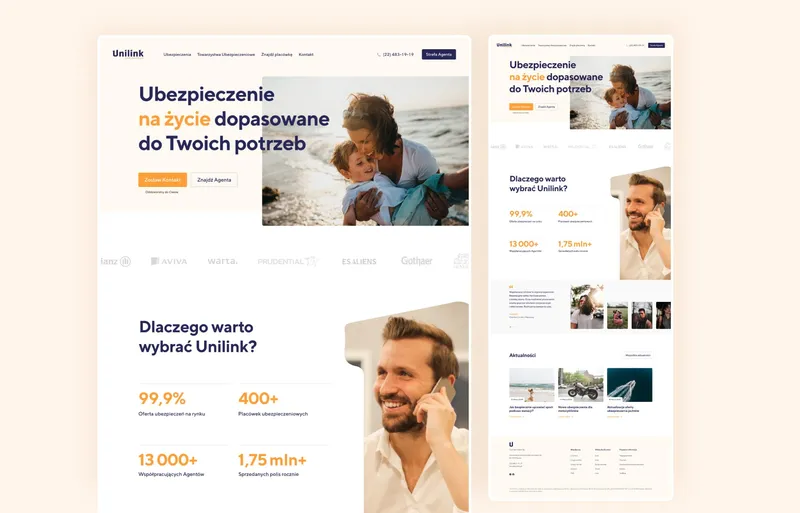
Below you can see some of the results of the custom CMS we built for an insurance broker. We designed a fully customizable, module-based CMS that can adjust to changing needs. We made sure that this CMS is SEO friendly and allows the broker to run A/B testing.
Key Points to Remember
- If you just need a simple website with basic features, a ready-made content management system like WordPress could be a great option for you.
- If you want your website to stand out and offer a user-friendly interface with advanced features, a custom CMS is the right choice for you.
- A custom CMS offers scalability, high performance, features tailored to your needs, unique design, personalized customer service, and security.
- Once you decide to invest in a custom CMS, make sure to choose a reliable development team.
- A custom CMS can improve your website's performance and fit the way your team works with content.
Do you want to create a custom CMS?
Contact us!